
November 3, 2026
Loading third-party analytics scripts introduces several red flags and compromises user data privacy. Transitioning to clean, self-hosted server-side logging keeps application codebases lightweight and guarantees absolute user anonymity.
Most products know far more about their users than they need to. Analytics scripts that track user behaviour down to clicks and scrolls on individual pages are widespread in some industries, with every session recorded “just in case” the data proves useful later.
At Liber, we believe that more behavioural data doesn’t necessarily mean better product decisions. Rather, it can come with hidden costs to performance, complexity, security, and user trust.
Generally, there are two types of data a product can collect. The first is what it needs to operate: registrations, upgraded subscriptions, API call failures. The second is user behaviour: the pages they visit and how long for, the keystrokes they make, their exact flow through a page. We believe the first type is most useful for many organisations. It’s what tells you whether your new homepage led to more subscriptions or if users are deploying the new feature you just launched. It answers a direct question the team has about the product.
The second is often collected first and justified later. Teams notice their conversions have dropped and check the session replays hoping to find answers. In the past, they’ve even found information they didn’t expect to collect, such as card details and passwords.
The collection of credentials mentioned above has largely been patched out of session replay tools with more advanced redaction technology. Even so, every third-party provider you’re sending potentially user-identifiable data to, increases your attack surface. A breach of a third-party vendor that exposes your users will erode trust just as well as a breach of your own servers.
It’s also another party you have to trust to use your user’s data responsibly. We analysed the most popular session replay tools and found that some, such as Microsoft Clarity, bundle data to create user profiles that are then sold to advertisers. Others aren’t so brazen, but use the data for their own purposes, including “internal benchmarking”, “modeling”, “marketing”, and “training of AI technology”.
Despite the wide use of your data by vendors, legal exposure sits mostly with you. Session replay tools are increasingly appearing in litigation under CIPA, and the terms of every vendor we checked pushed content and sensitive-data responsibility onto their customers.
Under GDPR, the organisation that determines why and how personal data is processed is generally the data controller. While processors do have their own legal duties, in practice, if your analytics tool captures passwords, payment details or other sensitive information, you can’t necessarily dodge accountability by pointing at the vendor. It’s your responsibility to understand:
Your answers must match both your legal responsibility (including legitimate purpose) and the consent you’ve collected from your users. All of this can become a headache when your vendors change their terms or collection practices or aren’t fully clear about who they share with.
The consequences of getting it wrong have been seen in the real world in the US. In 2023, the FTC took action against Pharmacy platform GoodRx over its sharing of sensitive health information with advertising platforms via third-party tracking tools. It received a $1.5 million civil penalty. Session replay, meanwhile, has been the target of lawsuits in California under its GDPR-like California Invasion of Privacy Act (CIPA). Plaintiffs have alleged that tools recording visitors' interactions with websites intercept communications without legally sufficient consent.
Any external integration adds to the load of a development team that likely already has a dozen or more dependencies to maintain. As we covered in The Architecture Legacy, the cost of maintaining third-party dependencies is small…until something goes wrong. When vendors change APIs, consent configs break, external services have an outage and so on. Your devs get pulled away from what they’re working on to push out an emergency patch. And it’s not uncommon to end up with a third-party script that in itself relies on another service, making behaviour incredibly difficult to predict.
These types of errors are only becoming more common as the number of third-party scripts and their complexity increases. Contentsquare’s 2026 Digital Experience Benchmark found that API error rates rose by 16% year on year. Part of that was attributed to the growing reliance on third-party integrations.
While those stats don’t look at analytics services specifically, we hope the general point is clear. Interconnected systems add complexity and therefore failure points. Teams should know which external services products rely on, what happens when they fail, and most importantly, whether they’re all necessary.
Beyond maintenance, the performance implications of too many third-party scripts is worth considering. Third-party analytics scripts may be relatively lightweight, but they’re not free. A JavaScript script without async or defer can block HTML parsing while it downloads and executes. While research on analytics scripts specifically is limited, a Chrome engineering team lab test found that adding a Google Tag manager container to a site can produce a near 20-fold increase in Total Blocking Time (TBT), as well as significant increases in CPU busy time and load times.
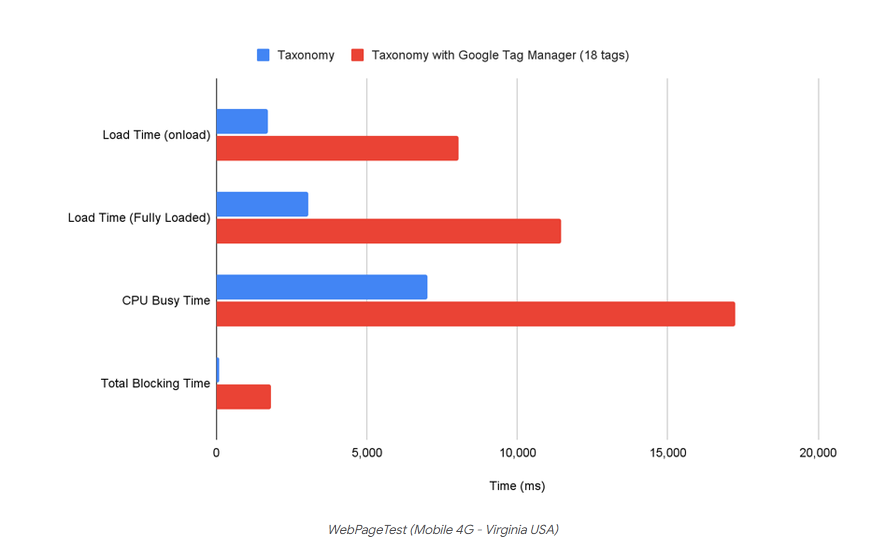
Many analytics implementations avoid or optimize for this, but the JavaScript still needs to run on the browser’s main thread, which can still delay responses to user input. Google found that moving the execution of the GTM container and its associated tag scripts to a web worker reduced TBT by 92%. That’s much better, but it’s still not free. If you feel the analytics are adding a measurable benefit to your business, it’s likely worth it from a performance perspective. But how sure are you that they are?
In his 1982 book Megatrends, John Naisbitt wrote “We are drowning in information but starved for knowledge”. While Naisbitt had not yet witnessed the rise of session analytics, like many things in his publication, it turned out to be prophetic. According to a 2019 Spunk survey, business and IT leaders estimate that 55% of their organisations data is “Dark”. It’s unquantified and untapped, with very few organisations able to successfully tap or even find all of the data they collect.
We believe intrusive analytics tools often fall into this bucket. They’re built to collect everything up front, producing far more data than any team can act on. A medium sized commerce site will record hundreds of thousands of sessions a month. They’re only checked on the odd-chance something goes wrong, such as a checkout bug, sudden drop in conversions, or support ticket. All questions that can likely be debugged through other means more effectively. Teams end up with thousands of event types, many badly named or duplicated, with heatmaps generated for pages that were redesigned months ago.
To be clear, we’re not saying that invasive analytics are completely useless. In particular the aggregated data can provide some insights. But if you’re looking for the answer to a specific question, you have to wade through a sea of digital noise to find it. Most organisations just don’t have the time for that.
In fact, despite you taking on the exposure, the data tends to be much more useful to the analytics vendor. Contentsquare’s Digital Experience Benchmark uses aggregated user data from its customers. FullStory and LogRocket use it to train AI models. Microsoft Clarity uses it to sell advertising profiles. These companies are likely generating far more revenue from your customer data than you are, yet you’re the one paying the bill and taking on much of the legal responsibility.
At Liber, we’re strong advocates for user privacy. We’ve worked with organizations that take it extremely seriously, down to running no trackers and collecting only the information required to run the service. We also recognise that detailed measurement is necessary for some businesses.
Our recommendation is to start with the outcome the team needs to understand, then see how you can make it happen with first-party, server side telemetry. For most questions that are a genuine need, server side data will be more than sufficient.
The backend is the most direct and reliable source of confirmation for most business outcomes. It knows when an account has been registered, a checkout completed, a subscription changed, or a payment failed. A subscription upgrade event might only need a few fields:
{
  "event": "subscription_upgraded",
  "plan_from": "basic",
  "plan_to": "pro",
  "region": "EU",
  "occurred_at": "2026-10-16T10:00"
}
Note that in this case the event doesn’t include a username, email address, or device fingerprint. That’s because it’s not required if the desire is to count the number of subscription upgrades over time in each region. The timestamp is also truncated to not collect the exact millisecond, as this would make it easier to tie it back to an individual in combination with metadata from another source. Operational telemetry can follow the same principles where logical. An API error can record a normalised route, status code, error category, and latency without storing the request body.
Server-side events still need a reliable implementation to be useful, obviously. You need to make sure retries, duplicate requests, and asynchronous payment notifications don’t affect your counts. Events need to be designed with care from both a privacy and implementation perspective.
If you need to measure the results of external referrals and advertising campaigns, sever-side implementation can allow you to do so using first-party data. You don’t necessarily need to measure what happens on another website to record where a visit came from. Campaign links can contain UTM parameters to identify their source, medium, and campaign. Your website can capture these when someone arrives and associate them with a later registration or purchase. Advertising platforms can also provide click identifiers such as Google’s gclid to help associate a visit with an ad campaign.
There are limitations to this, of course. A server can’t measure how many times an advert was shown on an external platform or account for clicks that didn’t result in a visit. For those metrics, you’d need the advertising platform’s reporting or a dedicated measurement integration. Referral information also might not be as complete, since browser policies can restrict the information passed to your server and users switching devices or arriving through redirects can make attribution more difficult.
Even so, you can measure a great deal without extensive third-party analytics scripts. By combining first-party campaign data with confirmed conversions and only the ad platform reporting you genuinely need, you can build a useful picture of what’s driving results with greater control over what you collect and share.
If you have a genuine need to know when someone clicks a button that’s not associated with a server request, some client-side instrumentation is probably necessary. However, that doesn’t mean it needs to be an extensive third-party session replay tool. A small first-party script can record a limited set of pre-defined events such as a click on a CTA, expanding an accordion, or the onboarding step they reached. Events are then sent to an endpoint your organisation controls using sendBeacon() or similar.
Regardless of what you’re collecting, we believe the best approach is to ensure it has a defined purpose, a documented set of fields, and only lasts for as long as you need it. Neglect removing enough first-party scripts and eventually you fall right back into the problem of collecting swathes of data you don’t need.
First-party or third-party, legal frameworks such as GDPR mandate that, without specific consent:
It’s important to assess any tracking using this criteria to ensure you don’t need to update your terms and consent before proceeding.
Not every organization has the expertise to build their own analytics. Businesses that rely on platforms like Squarespace, Shopify, WordPress, and similar platforms, often don’t have experienced developers behind them. Partnering with a full-stack services provider can be very helpful in this scenario if you want to stick to the in-house route. It's also worth noting that there are also open source platforms such as Plausible Analytics and Matomo that can be self-hosted.
Plausible focuses on straightforward website analytics such as traffic sources, page views, and conversion. Matomo has more rich data such as visitor-level analytics, goal tracking, heatmaps, and more. The open source nature of these tools allows you to tweak the platforms to your needs, and they have controls that allow you to customize exactly what you collect. The most important part, however, is that the data is stored on servers you control and you therefore have full visibility and control over how it is stored, secured, and used.
Escaping the analytics trap is ultimately not about cutting them out entirely. Rather, it’s about avoiding the common pitfall of tracking more than you need and ending up with a hoard of useless data, a slower site, more maintenance, lower user trust and more legal headache for very little tangible gain.
We believe a mindset that promotes purposeful and intentional measurement allows businesses to turn a liability into an asset. Focusing on the questions your teams need to know and building privacy-respecting methods of answering them allows you to build products that are leaner, more secure, and command user trust. Leaving “just in case” data behind allows you to stop focusing on knowing everything about your users and start understanding what will help you to build a better product.